How to split PDF files in Java (Tutorial)
Split PDF files programmatically
TL;DR
- Goal: Split PDF files programmatically in Java.
- Tools covered: JPedal, Apache PDFBox, iText.
- Process: Non-destructive splitting (into pages or chunks) using each library's API.
- Outcome: New files are created, leaving the original PDF untouched.
Introduction
The PDF file format is not natively supported by Java. Therefore, to split a PDF file into multiple PDFs, you will need an external library. This tutorial explains how to split PDF files using three of the most popular Java PDF libraries. JPedal, Apache PDFBox, and iText. By the end, you should have a clear picture of which library best fits your project's needs.Use Cases
Why split a PDF in Java? Developers often encounter scenarios where large documents need to be segmented for easier processing. Common use cases include:- Invoice Processing: Separating a bulk PDF into individual client invoices.
- Archiving: Breaking down large reports into chapter-based files.
- Security: Extracting non-sensitive pages from a confidential document to share publicly.
Getting Started
All three libraries are available via Maven. Add the relevant dependency to yourpom.xml file.
JPedal
- Download the JPedal trial jar.
- Install the jar to your local Maven repository
mvn install:install-file -Dfile=<path-to-JPedal-jar> -DgroupId=com.idrsolutions -Dpackaging=jar -DartifactId=jpedal -Dversion=1.0 - Add to your project
<dependencies>
    <dependency>
        <groupId>com.idrsolutions</groupId>
        <artifactId>jpedal</artifactId>
        <version>1.0</version>
    </dependency>
</dependencies>
PDFBox
<dependency>
    <groupId>org.apache.pdfbox</groupId>
    <artifactId>pdfbox</artifactId>
    <version>3.0.3</version>
</dependency>
iText
<dependency>
    <groupId>com.itextpdf</groupId>
    <artifactId>itext-core</artifactId>
    <version>9.3.0</version>
    <type>pom</type>
</dependency>
How to split a PDF using JPedal
JPedal's PdfManipulator class provides a clean, high-level API designed specifically for common PDF manipulation tasks. The calls are concise and require minimal boilerplate.
How to split a PDF file into pages
To split a PDF file into individual pages, simply call the following method.PdfManipulator.splitIntoPages(new File("/path/to/input.pdf"), new File("/path/to/output-folder"), 1);
How to split a PDF file into two files
To split a PDF file into two files, call the following method and provide the page number where you want to split.
The
first file will contain pages up to and including pageToSplitAt, and the second file will contain the
rest.PdfManipulator.splitInHalf(new File("/path/to/input.pdf"), new File("/path/to/output-folder"), pageToSplitAt);
How to split a PDF file into multiple files
To split a PDF file into multiple files, call the following method and provide the number of pages you want per
file.
Each file will contain pagePerNewFile number of pages, and the final file will contain the remainder.PdfManipulator.splitIntoPages(new File("/path/to/input.pdf"), new File("/path/to/output-folder"), pagePerNewFile);
How to split a PDF file that is password protected
JPedal also supports PDF file splitting for password protected files. To do this, provide the password as the last
parameter in any of the above methods.PdfManipulator.splitIntoPages(new File("/path/to/input.pdf"), new File("/path/to/output-folder"), 1, "password");
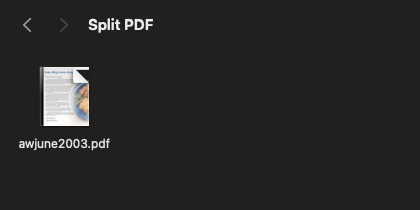
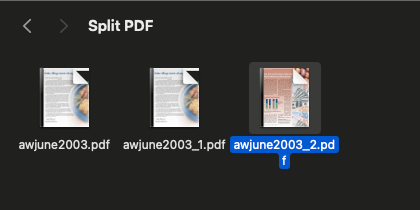
Before and after
Notice how the original file remains untouched
How to split a PDF using Apache PDFBox
PDFBox is a mature, open source PDF library. The main benefit is that it is free to use without licensing concerns.
Split into individual pages
To split a PDF file into individual pages, use the following code.final PDDocument document = Loader.loadPDF(new RandomAccessReadBufferedFile("inputFile.pdf"));
final Splitter splitter = new Splitter();
final List<PDDocument> pages = splitter.split(document);
final Iterator<PDDocument> iterator = pages.listIterator();
int i = 1;
while (iterator.hasNext()) {
final PDDocument page = iterator.next();
page.save("output/output_" + i++ + ".pdf");
page.close();
}
document.close();
Split at a specific page number
To split a file into two files, use the `setSplitAtPage(int)` method.final Splitter splitter = new Splitter();
splitter.setSplitAtPage(5);
final List<PDDocument> parts = splitter.split(document);
How to split a PDF using iText
iText 7 is a powerful, feature-rich library that handles a wide range of PDF tasks. Splitting with iText
requires more manual work than either JPedal or PDFBox, you copy individual pages into new documents
using PdfDocument and PdfPage.
Split into individual pages
To split a PDF file into individual pages, use the following code.final PdfDocument sourcePdf = new PdfDocument(new PdfReader("inputFile.pdf"));
final PdfSplitter splitter = new PdfSplitter(sourcePdf) {
int partNumber = 1;
@Override
protected PdfWriter getNextPdfWriter(PageRange documentPageRange) {
try {
return new PdfWriter("output/output_" + partNumber++ + ".pdf");
} catch (final IOException e) {
throw new RuntimeException(e);
}
}
};
final List<PdfDocument> splitDocuments = splitter.splitByPageCount(1);
for (final PdfDocument doc : splitDocuments) {
doc.close();
}
sourcePdf.close();
Split at a specific page number
To split a PDF file into two files, run the code twice with the page range different each time.final List<PdfDocument> splitDocuments = splitter.extractPageRanges(new PageRange("1-5"));
Library Comparison
| Feature | JPedal | Apache PDFBox | iText 7 |
|---|---|---|---|
| License | Commercial | Apache 2.0 (free) | AGPL / Commercial |
| API simplicity |
⭐⭐⭐⭐⭐ Very high |
⭐⭐⭐ Medium |
⭐⭐ Lower |
| Lines of code to split | ~1 | ~20 | ~25+ |
| Password-protected PDFs | ✅ Built-in | ✅ Supported | ✅ Supported |
| Non-destructive splitting | ✅ | ✅ | ✅ |
| Split by page count | ✅ | ✅ | ✅ |
| Split in half at page N | ✅ One-liner | ⚠️ Manual | ⚠️ Manual |
| PDF 2.0 support | ✅ | ⚠️ Limited | ✅ |
| Commercial use | ✅ Licensed product | ✅ Free | ⚠️ Requires commercial license |
| Large file handling | ✅ Streaming | ⚠️ Requires heap tuning | ✅ |
Which library should you choose?
Choose JPedal if you want a professional, supported product with the simplest possible API for PDF splitting and manipulation. JPedal's PdfManipulator reduces a multi-step operation to a single method call, and IDRsolutions provides commercial support. JPedal also supports a broad range of features including rendering, text extraction, viewing, and manipulating. It's the right choice for enterprise teams who need reliability without spending time managing low-level PDF internals.
Choose Apache PDFBox if you need a completely free, open-source solution with no licensing obligations, for commercial or non-commercial projects alike. PDFBox is well-maintained by the Apache Software Foundation, has a large community, and handles the vast majority of real-world PDF splitting tasks. PDFBox contains some of the same features as JPedal including extraction, printing, and rendering. The trade-off is more boilerplate code and the need to manage memory carefully for very large files.
Choose iText 7 if you need operations like creating PDFs from templates or PDF/A compliance alongside splitting. iText is a mature and battle-tested library used by major enterprises. Be aware that commercial use requires a paid license, using it under AGPL means your application's source code must also be open-source.
Summary
In this article I showed you how to break large PDF files into multiple documents still in the PDF format. Breaking a PDF into multiple files will have many advantages such as being able to focus on specific content and helping with file size management.
I compared JPedal, PDFBox, and iText and why you should pick each one.
Frequently Asked Questions
Does splitting a PDF affect the quality of the pages?
No. When using JPedal, the pages are extracted as-is. The vector graphics, images, and text resolution remain identical to the original source.
How do I handle large PDF files efficiently?
For very large files, ensure your JVM has sufficient heap memory allocated. JPedal is optimized to handle large documents by streaming content where possible.
Can I split a PDF in Java without an external library?
It is technically possible but highly complex to write a raw PDF parser from scratch. Using a dedicated library like JPedal, Apache PDFBox, or iText is standard practice to handle compression, encryption, and cross-reference tables correctly.